Our Blog

How to Erase and Reinstall macOS on an Apple Silicon Mac

How to Erase and Reinstall macOS on an Apple Silicon Mac

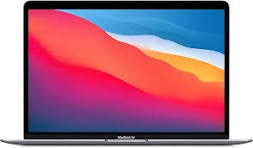
The MacBook A2338 is an Apple Silicon Mac, so the old Intel shortcut Command + R does not apply.
Use the steps below to erase and reinstall macOS correctly.

Method 1: Standard Recovery Mode (Apple Silicon)

  1. Shut down your Mac completely.
  2. Press and hold the power button (Touch ID) until Loading startup options appears.
  3. Release when the startup options screen appears (disk icon + gear icon).
  4. Click Options > Continue.
  5. Select your startup disk, then click Next.
  6. Enter an administrator password, then continue.
  7. In Recovery, open Disk Utility to erase your drive (if needed), then choose Reinstall macOS.

Method 2: Fallback Recovery Mode (if standard recovery fails)

If standard recovery is corrupted:

Read More →
How to Transfer Files Between an M1 Mac and Another Mac

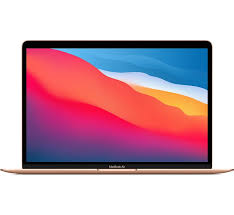
You can connect a Mac with Apple silicon to another Mac so it appears like an external drive, then transfer files directly.

What you need

  • A USB, USB-C, or Thunderbolt cable
  • Two Mac computers (one with Apple silicon)

Steps to transfer files

  1. Connect the two Macs with a USB, USB-C, or Thunderbolt cable.
  2. On the Apple silicon Mac, go to Apple menu > Shut Down.
  3. Press and hold the power button until Loading startup options appears.
  4. Click Options, then click Continue.
  5. If prompted, enter an administrator password to open Recovery mode.
  6. In the menu bar, choose Utilities > Share Disk.
  7. Select the disk or volume you want to share, then click Start Sharing.
  8. On the other Mac, open Finder and click Network under Locations.
  9. In the Network window, double-click the Mac that is sharing its disk.
  10. Click Connect As, choose Guest, then click Connect.
  11. Transfer your files.
  12. When finished, eject the shared disk on the other Mac.

If the connection does not appear immediately, disconnect and reconnect the cable, then reopen the Network view in Finder.

Read More →
How to Transfer Files from iPhone or iPad to Mac

How to Transfer Files from iPhone or iPad to Mac

Transferring documents between your iPhone, iPad, or iPod touch and your Mac or PC is straightforward when you use Apple’s built-in file-sharing workflow.

To transfer files, your iOS app must support file sharing (for example: Pages, Numbers, GoodReader, and similar apps).

Open the file transfer interface

  1. Connect your iPhone or iPad to your computer.
  2. Open iTunes (or Finder on newer macOS versions) if it does not open automatically.
  3. Select your device, then open the Applications section (or Files section in Finder).
  4. Scroll to the file-sharing area to view apps that can send or receive documents.

Transfer files from iOS to your computer

  1. Select the app that contains the document.
  2. In the files pane, drag the file from the device to your desktop or preferred folder.

Transfer files from your computer to iOS

  1. Select the app in the file-sharing area.
  2. Click Add, choose your file, and click Open.
  3. You can also drag and drop files directly into the app’s files pane.

Once added, the document will appear inside that app on your iPhone or iPad.

Read More →
Thunderbolt 3 and USB-C: What’s the Difference?

Thunderbolt 3 and USB-C: What’s the Difference?

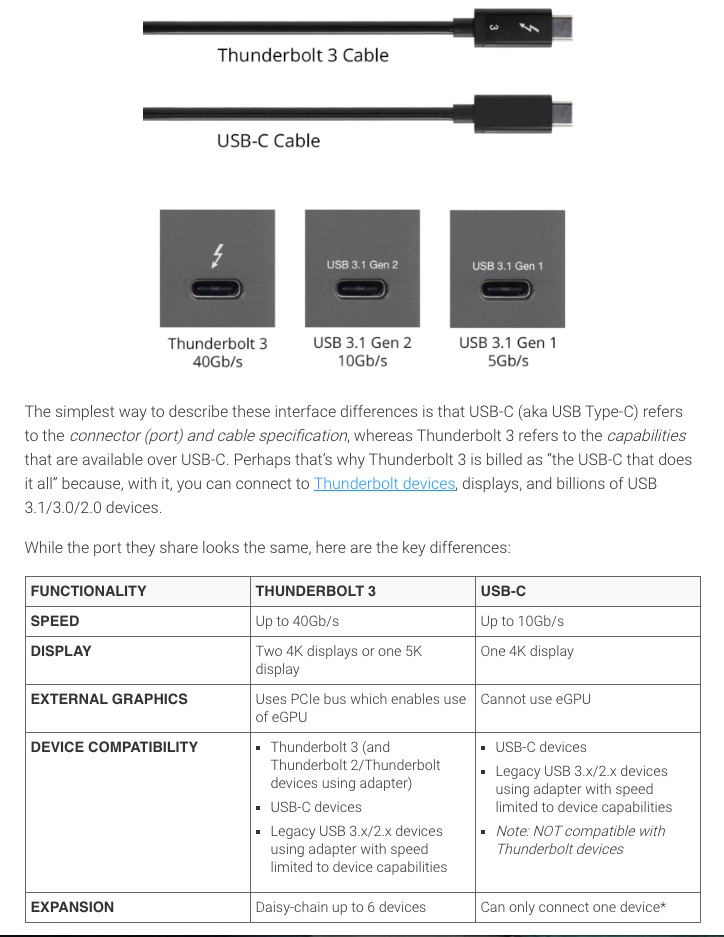
USB-C and Thunderbolt 3 look identical at the port level, but they offer different capabilities. This confuses many Mac users when they buy cables, docks, and external drives.

Same connector, different technology

  • USB-C is the connector shape.
  • Thunderbolt 3 is a high-speed protocol that uses the USB-C connector.

A USB-C port may support basic USB data only, while a Thunderbolt 3 port supports much more bandwidth and advanced features.

Speed differences

  • Typical USB-C (USB 3.x): up to 5Gbps or 10Gbps, depending on version
  • Thunderbolt 3: up to 40Gbps

For large file transfers, video editing drives, and pro workflows, Thunderbolt 3 can be significantly faster.

Read More →
How to Connect an M1 MacBook to Apple Servers

How to Connect an M1 MacBook to Apple Servers

Connecting your M1 MacBook to Apple’s servers is essential for activation, software updates, and using iCloud services. If you’re encountering issues, here is a step-by-step guide to troubleshooting and ensuring a successful connection.

1. Check Apple’s System Status

Before troubleshooting your device, ensure the issue isn’t on Apple’s end. Visit the Apple System Status page to check for any outages related to macOS Software Update, iCloud, or Activation.

2. Verify Your Internet Connection

Ensure your MacBook is connected to a stable Wi-Fi network or Ethernet.

Read More →
The Hidden Dangers: Why Your Laptop and Your Coffee Don't Mix

The Hidden Dangers: Why Your Laptop and Your Coffee Don't Mix

Fluid damage is one of the most common and complex issues we handle here at Dr. Chip. While a quick spill might seem like a minor inconvenience, it can trigger a devastating chain reaction inside your computer.

Why Liquid Damage is So Hard to Fix

When fluid enters your machine, it doesn’t just ‘dry out’. Even after the liquid evaporates, it leaves behind minerals and sugar (if it was a drink) that cause corrosion. This corrosion eats away at the delicate logic board traces and solder joints, creating electrical shorts that can occur days or even weeks after the initial spill. Repairing this often requires ultrasonic cleaning and microscopic logic board repair, which is far more intensive than a simple parts swap.

Read More →
How to know if your Mac screen needs replacing

How to know if your Mac screen needs replacing

Your Mac’s display is one of its most critical components. When it starts showing problems, it can range from a minor annoyance to making your computer completely unusable. Here’s how to know when it’s time for a professional screen replacement.

Visible Cracks or Chips

The most obvious sign is physical damage. Even a small crack can spread over time due to temperature changes and normal use. If you see any cracks in your display glass or LCD panel, it’s best to get it replaced before the damage worsens.

Read More →
5 Signs your hard drive is failing

5 Signs your hard drive is failing

Your hard drive stores everything — your documents, photos, music, and the operating system itself. When it starts to fail, you could lose it all. Here are five warning signs to watch for.

1. Slow Performance

If your Mac takes significantly longer to boot, open applications, or save files, your hard drive may be struggling. While slow performance can have many causes, a failing drive is one of the most serious.

Read More →

We are here to help you!

Have a Queries? Work enquiries? Drop us an email and we shall get back to you in a working day.

We serve San Diego County, including Clairemont, Pacific Beach, UTC, La Jolla, Banker's Hill, Downtown, Ocean Beach, Mission Valley, Chula Vista, and surrounding zip codes. See all local service pages on our San Diego service areas hub.